
When you cancel a software subscription, you usually keep paid access until the end of the billing period you already paid for. After that, features lock or downgrade, and your data sits in a retention window until the vendor deletes it. The distinction that matters is access versus ownership: the vendor decides how long your files, recordings and settings survive, and that window can be months or zero days. Export before you click cancel, not after.
TL;DR:
- Canceling usually stops the next charge but not the current period, so you keep access until the paid term runs out. Free trials are the exception, and canceling one can cut access immediately.
- Your data is held on the vendor's timeline, not yours. Microsoft documents 30 days expired and 90 days disabled for most business plans, and many smaller vendors publish less or nothing.
- Deleting an app does not cancel its subscription. You cancel in the App Store, in Google Play or on the vendor's website, depending on where you started paying.
- No law guarantees a refund for a renewal you forgot to cancel. Apple, Google and most vendors handle these requests case by case.
- If your business phone number lives inside a software service, port the number out before you cancel. Canceling first can lose the number.
Table of Contents
- The Four Things That Change When You Cancel, and When Each One Happens
- What Happens When You Cancel a Software Subscription: Your Data, Item by Item
- The Retention Window Is Real, but You Can't Count On It
- Deleting the App Doesn't Cancel the Subscription
- Forgot to Cancel? How Refunds Work After a Renewal
- Subscription Cancellation Services: How They Work and What They Cost You
- The Business Phone Number Trap: Port First, Cancel Second
- Own Your Call Answering, So Canceling Never Costs You Your Call History
- Frequently Asked Questions
- Sources
The Four Things That Change When You Cancel, and When Each One Happens
Canceling a subscription is not a single event. It sets off four separate changes on four separate clocks, and most of the surprises come from assuming they all happen at once.
- Billing stops first. The next renewal charge is called off right away. You are not normally refunded for the current period. You just aren't charged for the next one.
- Access continues until the period ends. Most monthly and annual plans keep working until the last day you paid for. If you cancel on day 3 of a 30-day cycle, you usually still get the other 27 days.
- Features downgrade or lock next. Some products drop you to a free tier where you can read your data but not edit it. Others shut you out completely. The vendor's terms decide which one you get, not the cancel button.
- Data deletion comes last, and sometimes never warns you. Your files, records and history usually sit in a retention window after access ends. Then they are deleted, often with no final reminder.
Free trials break the pattern. Apple's support page on canceling subscriptions warns that if you cancel during a free trial, you might lose access to the subscription immediately. If you are trialing something and want the full trial, set a reminder for the day before it converts instead of canceling on day one.
The bigger question is whether the tool should be a subscription at all. Some business software, call answering included, can be bought outright. We cover that in how to avoid monthly SaaS fees for call answering.
What Happens When You Cancel a Software Subscription: Your Data, Item by Item

What you lose depends on the type of data, not just the product. Use this table as a checklist before you cancel anything you run a business on.
| What you have in the tool | What usually happens after cancellation | Before you cancel |
|---|---|---|
| Paid features | Work until the period ends, then lock or downgrade to a free tier | Note the exact end date on your receipt |
| Files and documents you created | Read-only or inaccessible, then deleted after a retention window | Export in an open format such as CSV, PDF or DOCX |
| Call recordings and transcripts | Often deleted with the account, and rarely exported in bulk by default | Download the audio and transcripts, not just a summary report |
| Settings, scripts and automations | Almost never included in exports | Screenshot or copy them out by hand |
| Integrations with other tools | Disconnect, so other tools stop receiving data with no error message | List every connected app and plan a replacement |
| Phone numbers provisioned by the vendor | Released back to the vendor's pool, where they can be lost | Port the number to a carrier you control first |
| Downloaded or streamed content (music, fonts, templates) | Stops working if it was licensed through the subscription | Check which items you bought outright and which you only rented |
The row most people miss is call recordings. If your phone system or answering tool stores your call history, that history is often the only record of what a customer asked for and what you quoted. We explain what a good one should let you export in call recording and transcript dashboards for small firms.
Pro Tip: Do one full export a week before you cancel. Then open every exported file on a different computer. Exports often fail quietly. A CSV may be missing attachments, or audio may download as links that stop working once the account closes. You want to find that out while you still have access.
The Retention Window Is Real, but You Can't Count On It
Large vendors usually publish how long they keep your data after a subscription ends. Small vendors often don't, and a vendor that publishes nothing can delete your data whenever it likes.
Microsoft's documentation for Microsoft 365 business subscriptions describes a staged wind-down for most plans:
- The subscription first enters an expired state, during which users can still work normally.
- It then moves to a disabled state, where only admins can reach the data.
- After that, the data is deleted.
30 days expired, 90 days disabled, then deleted. That is Microsoft's published timeline for most Microsoft 365 business plans, and it is one of the more generous ones you will find.
Treat any retention window as a courtesy, not a promise. Terms of service usually let the vendor shorten it. A vendor that goes out of business or gets acquired may skip it entirely.
If you are in the EU or UK, privacy law gives you some leverage. Article 20 of the GDPR gives you a right to receive personal data you provided in a "structured, commonly used and machine-readable format." That right covers personal data, though. It does not cover your scripts, templates or business configuration, so it won't rescue everything.
Deleting the App Doesn't Cancel the Subscription
Uninstalling an app does not end the subscription. Your card keeps getting charged whether the app is on your phone or not. Google Play's help page on canceling subscriptions says plainly that uninstalling the app won't cancel your subscription, and Apple's subscriptions work the same way.
Where you cancel depends on where you started paying:
- Paid through Apple. Cancel in Settings, then your name, then Subscriptions on iPhone or iPad. Canceling with the developer directly won't stop an Apple charge.
- Paid through Google Play. Cancel in the Play Store under Payments & subscriptions, then Subscriptions.
- Paid on the vendor's website. Cancel in the account or billing page on that website. Neither app store can see the subscription.
A quick way to check: search your email for the last receipt. Whoever sent it is the company you need to cancel with.
What Happens If You Cancel Apple Music
Canceling Apple Music works like most store subscriptions. You keep listening until the current billing period ends, and then the subscription stops.
After the period ends, songs you added or downloaded from the Apple Music catalog stop playing, including offline downloads. Music you bought outright from the iTunes Store stays yours, as do files you imported yourself.
This is the access-versus-ownership split in its plainest form. If you have spent years building playlists from catalog tracks, those playlists depend on the subscription.
Forgot to Cancel? How Refunds Work After a Renewal
In most cases, there is no automatic right to a refund for a renewal you forgot to cancel. You agreed to recurring billing, and the charge went through as agreed. Refunds for forgotten renewals are a goodwill decision by the vendor or app store.
That doesn't mean you shouldn't ask. Here is how to give yourself the best chance:
- Ask fast. A request made within a day or two of the charge, with no usage since, is far more likely to be granted than one made three weeks later.
- Use the right channel. For Apple purchases, request a refund at reportaproblem.apple.com. For Google Play, start from your order history in Play. For direct subscriptions, email the vendor's billing team and say you haven't used the renewed period.
- Cancel at the same time. Refunds are easier to approve when the vendor can see that you've already stopped future billing.
- Use a chargeback only as a last resort. A card dispute over a charge you authorized often fails. It can also get your account with that vendor closed.
In the US, the law focuses on how you get into a subscription and how you get out of it, not on refunds. The FTC's page on the Restore Online Shoppers' Confidence Act explains that online sellers of recurring plans must clearly disclose the terms, get your express informed consent, and provide simple ways to stop recurring charges. If a vendor makes canceling hard to find, that is worth reporting. Forgetting to cancel, on its own, isn't something the law covers.
Subscription Cancellation Services: How They Work and What They Cost You
Subscription cancellation services find recurring charges and cancel them for you. Most follow the same pattern:
- They read your transactions. You link a bank account or card, usually through a read-only connection, and the service flags charges that repeat.
- They cancel on your behalf. For merchants they know, they contact the company or use its cancellation process for you. Some issue virtual cards you can switch off, which stops future charges at the payment level.
- They charge for it. That might be a monthly fee, a share of what they save you, or a premium tier. Read the pricing before you link your bank.
The trade-off is that you are handing your full transaction history to a third party to fix a problem you can usually solve in 20 minutes. Read through the last three months of card statements, highlight anything that repeats, and cancel each one in the right place.
One more caution: blocking the card stops future payments, but it doesn't cancel the subscription or export your data. If the tool holds business records, a blocked payment can lock you out before you've saved anything.
The Business Phone Number Trap: Port First, Cancel Second

This is where the obvious move is the wrong one. If your business phone number was issued by a software service, such as a phone system, a call-answering tool or a virtual number app, canceling the subscription can give the number back to the vendor. Your number may be printed on vans, signs and years of online listings.
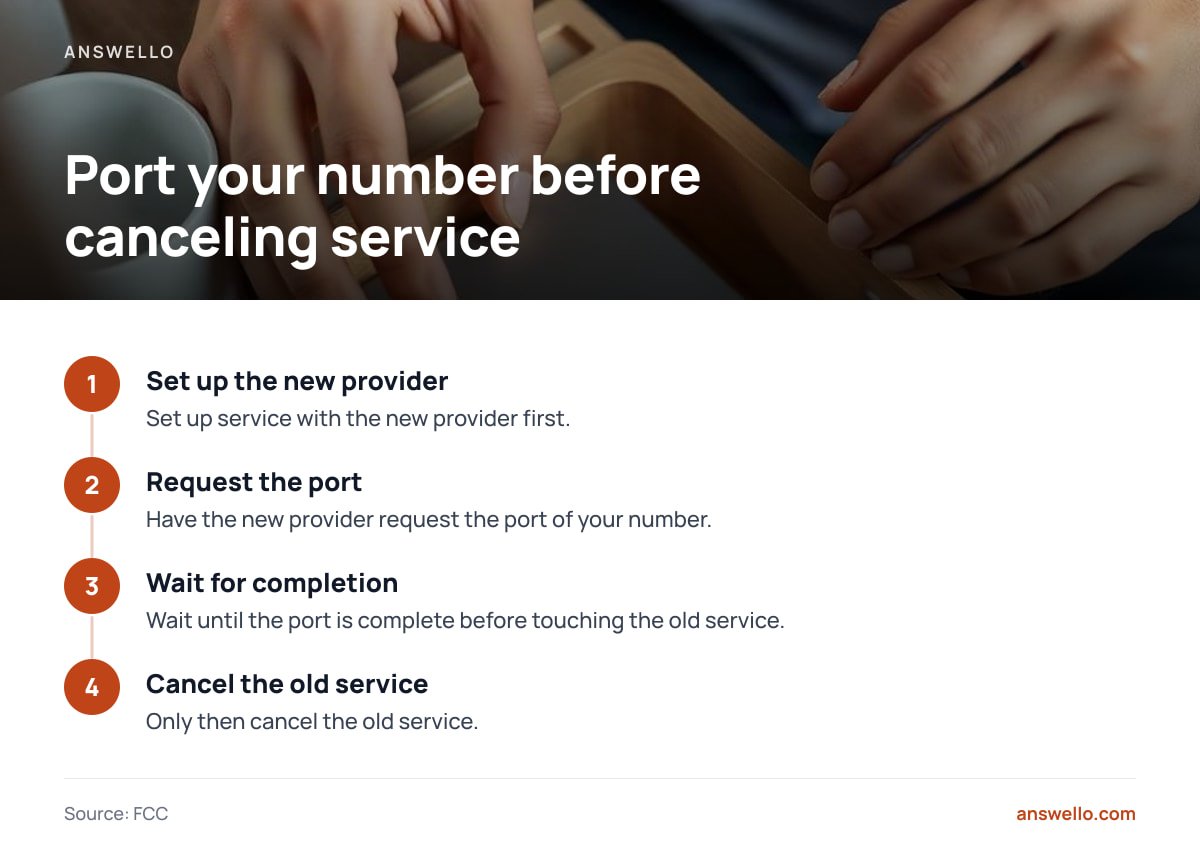
The FCC's guide to keeping your telephone number is clear about the order:
- Set up service with the new provider.
- Have the new provider request the port.
- Wait until the port is complete.
- Only then cancel the old service.
If you cancel first, the number may be gone before anyone can move it.
Don't cancel your old phone service before the number has ported. Do it in that order, or you risk losing a number your customers already have saved.
For trades businesses running several brands, the risk multiplies. Each brand's number may be a separate line item on a separate subscription, and missing one can cut off a whole brand's incoming calls. Before you cancel anything, list every number, the account it lives in, and who controls the port. If you're auditing your whole stack while you're at it, our guide to subscription business software worth paying for helps you decide what to keep.
Own Your Call Answering, So Canceling Never Costs You Your Call History
Everything above is a risk you take on when your call answering is a subscription. If the plan lapses, your recordings, transcripts and scripts all depend on the vendor's retention window. Answello is a one-time purchase instead. It picks up the calls you miss while you're on a job, identifies who's calling and what they need, and texts you the caller's name, number and request. Recordings and transcripts sit in a dashboard you own. One payment covers several brands or numbers, so you don't pay per site.
The self-install package is $399 one-time. The fully set-up version with a custom script is $895 one-time. The optional maintenance plan is $119 a month, cancel anytime. Here is the honest limit: if you skip the plan, nobody updates your script when your services or prices change, so that's your job. Before you buy any answering tool, ours included, check the spec sheet for where recordings are stored and how to export them. Details are in how the Answello system works and what it costs.
Frequently Asked Questions
What happens to my data when I cancel a software subscription?
Your data usually stays available until the paid period ends, then becomes read-only or inaccessible during a retention window before it is deleted. The length of that window is set by the vendor and can be months or nothing at all. Export everything, including recordings and settings, before you cancel.
Can I get a refund if I forget to cancel a subscription?
Usually only as a goodwill gesture, because you agreed to the recurring charge. Ask within a day or two of the charge, before using the renewed period, and go through the channel you paid with: Apple, Google Play or the vendor's billing team. Card chargebacks for authorized charges often fail.
Will my subscription end if I delete the app?
No. Uninstalling an app does not cancel its subscription, and Google Play's help pages say so directly. You have to cancel through the App Store, Google Play or the vendor's website, wherever you started paying.
What happens if I cancel my Apple Music subscription?
You can keep listening until the current billing period ends. After that, songs added or downloaded from the Apple Music catalog stop playing. Music you bought from the iTunes Store or imported yourself stays in your library.
How do subscription cancellation services work?
They connect to your bank or card account, flag recurring charges, and cancel them on your behalf, sometimes by issuing virtual cards you can switch off. Most charge a monthly fee or a share of savings. You can usually do the same job yourself by reviewing three months of statements.
Should I cancel my old phone service before switching providers?
No. The FCC advises keeping the old service active until the number has finished porting to the new provider. Canceling first can mean losing the number entirely.
Sources
- Cancel a subscription from Apple | Apple Support
- Cancel, pause, or change a subscription on Google Play | Google Play Help
- What happens to my data and access when my Microsoft 365 for business subscription ends? | Microsoft Learn
- Restore Online Shoppers' Confidence Act | Federal Trade Commission
- Keeping Your Telephone Number When You Change Your Service Provider | Federal Communications Commission
- Art. 20 GDPR – Right to data portability | gdpr-info.eu
Leave a Reply