
AI receptionist call routing setup comes down to three decisions: who answers first, which few triggers send a caller to a human, and what happens when that human doesn't pick up. The third decision matters most, because a transfer that rings out into voicemail is worse than an AI that simply takes a message. Start with a short trigger list and tighten it after ten test calls.
TL;DR:
- Decide who answers first. For a crew of one to five people, ring the owner for about 20 seconds and let the AI catch the misses.
- Sort every call into three lanes: the AI finishes it, the AI takes a message, or the call transfers to a human right now.
- Transfer on a short list of triggers: emergency words, a request for a person, two failed clarifications, and a repeat call within 10 minutes.
- Make the transfer leg require a keypress, because to a phone system a voicemail greeting looks the same as a person answering.
- Every transfer needs a fallback that takes a message, texts the owner, and promises a callback window you can keep.
Table of Contents
- AI Receptionist Call Routing Setup Starts With Who Picks Up First
- The Three Lanes Every Call Falls Into
- Transfer Triggers and the Thresholds to Start With
- Warm, Blind, or Bridged: Picking a Transfer Method
- The Voicemail Trap, and a Ring Timeout That Avoids It
- Fallback Rules for When No One Answers
- Disclosure and Recording: Two Lines for the Greeting
- Test Your Routing With Ten Calls Before You Go Live
- Get a Missed-Call Safety Net Without Another Monthly Bill
- Frequently Asked Questions
- Sources
AI Receptionist Call Routing Setup Starts With Who Picks Up First
You can wire the AI and the human together in two ways. In an AI-first setup, every call hits the AI, which decides whether to transfer. In a human-first setup, your phone rings for a set number of seconds and the AI answers only if you don't.
If you run a crew of one to five people, pick human-first. A live answer from the person who will do the job needs no routing logic, and the AI only handles calls that would have gone to voicemail. AI-first earns its complexity when an office person or dispatcher reliably takes transfers during set hours, because then the AI filters spam and routine questions before they reach that person.
Human-first runs on conditional call forwarding. Phone carriers support forwarding when your line is busy, when you don't answer, and when your phone is unreachable. Point all three conditions at the AI's number. If you set only "no answer", calls made while you're on another call will still hit voicemail.
This article covers only the handoff rules. If you are still working out overnight coverage and pricing, the guide to an after hours virtual receptionist covers that. If you run several brands, each number needs its own version of the rules below, and the breakdown of an answering service for multiple business numbers explains how to keep them apart.
The Three Lanes Every Call Falls Into
Before you write a trigger, sort your calls. Every inbound call belongs in one of three lanes, and most routing mistakes come from having only two.
- AI finishes it. Hours, service area, whether you handle a certain job, a request for a quote callback. The AI collects the name, number and request, then ends the call. Aim for this lane to hold most of your volume.
- AI takes a message. The caller needs you, but not in the next five minutes: a scheduling change, an invoice question, a supplier. The AI records the details and tells the caller when to expect a call back.
- Transfer now. Someone is in danger, property is being damaged, or the caller has asked for a person. The AI tries to connect them live and has a fallback ready if the connection fails.
Most owners skip the middle lane and send everything non-trivial to a transfer. Then your phone rings in your pocket during every job, which is the problem you bought the AI to solve.
Transfer Triggers and the Thresholds to Start With
Keep the trigger list short. Every trigger you add raises the share of calls that interrupt you, and our starting target is under 20% of calls transferring. If you are above that after the first week, the rules are too broad.
| Trigger | Action | If no one answers |
|---|---|---|
| Emergency words (gas smell, flooding, sparks, no heat in freezing weather) | Transfer immediately; tell the caller to use the local emergency number (911 in the US, 112 across the EU) if anyone is in danger | Keep the caller on the line, take the address, send an URGENT text, retry in 5 minutes |
| Caller asks for a person | Transfer once, without arguing | Take a message and name a callback window |
| Two failed clarifications | Transfer | Take a message with the AI's best guess flagged |
| Number on your customer or VIP list | Transfer | Message tagged with the customer name |
| Second call from the same number within 10 minutes | Treat as urgent and transfer | URGENT text with both call summaries |
| Quote or pricing request | AI collects details, no transfer | Summary text to the owner |
| Cold sales call | AI ends politely | Log only |
Most setups miss the repeat-call rule. A caller who hangs up and redials immediately is telling you the matter is urgent, and no keyword list will catch that.
For emergency words, use the vocabulary of your trade. A plumber's list differs from an HVAC contractor's, and the guide to industry-specific after hours call training goes through the phrases callers actually use.
Warm, Blind, or Bridged: Picking a Transfer Method
The transfer method decides what happens to the caller during the handoff.
| Method | How it works | Risk | Use when |
|---|---|---|---|
| Blind | The AI forwards the call and drops off | Voicemail answers and nobody knows | Never for urgent calls |
| Warm | The AI stays on, announces the caller to you, then connects | Slightly slower, needs you to accept | Office staff or dispatch |
| Bridged with keypress | The AI calls you as a second leg and connects only after you press 1 | You must hear the prompt | Owner-operators on a mobile |
In SIP-based phone systems, a blind transfer is usually done with the REFER method defined in RFC 3515. The transferring side gets progress notifications, but an answered call is an answered call, and a voicemail pickup reports the same way a person does. If your system supports a bridged leg, use it for every transfer that matters.
The Voicemail Trap, and a Ring Timeout That Avoids It
To your phone system, a voicemail greeting looks exactly like a person saying hello.
This failure trips up most first-time setups. The AI transfers a gas-leak call to your mobile, you are on a roof with no signal, your carrier's voicemail picks up after 25 seconds, and the system logs a successful transfer. The caller leaves a message in a mailbox you won't check for an hour.
The fix is a timeout shorter than your carrier's voicemail pickup. In North America the standard ringing cadence is 2 seconds on and 4 seconds off, so a 20-second timeout gives you four rings. Elsewhere the cadence differs, so set the timeout in seconds, not rings. Then call your own number from another phone, don't answer, and count how long it takes your voicemail to answer. Set the AI's timeout at least 5 seconds below that.
Pro Tip: Make the transfer leg require a keypress. Have the AI call you, play "Incoming call from [caller name], press 1 to accept", and connect only on the keypress. Voicemail can't press 1, so a missed call falls through to your fallback rule in 20 seconds and not into a mailbox. It also tells you who is calling and why before you pick up, which saves the first 15 seconds of every urgent call.
Fallback Rules for When No One Answers
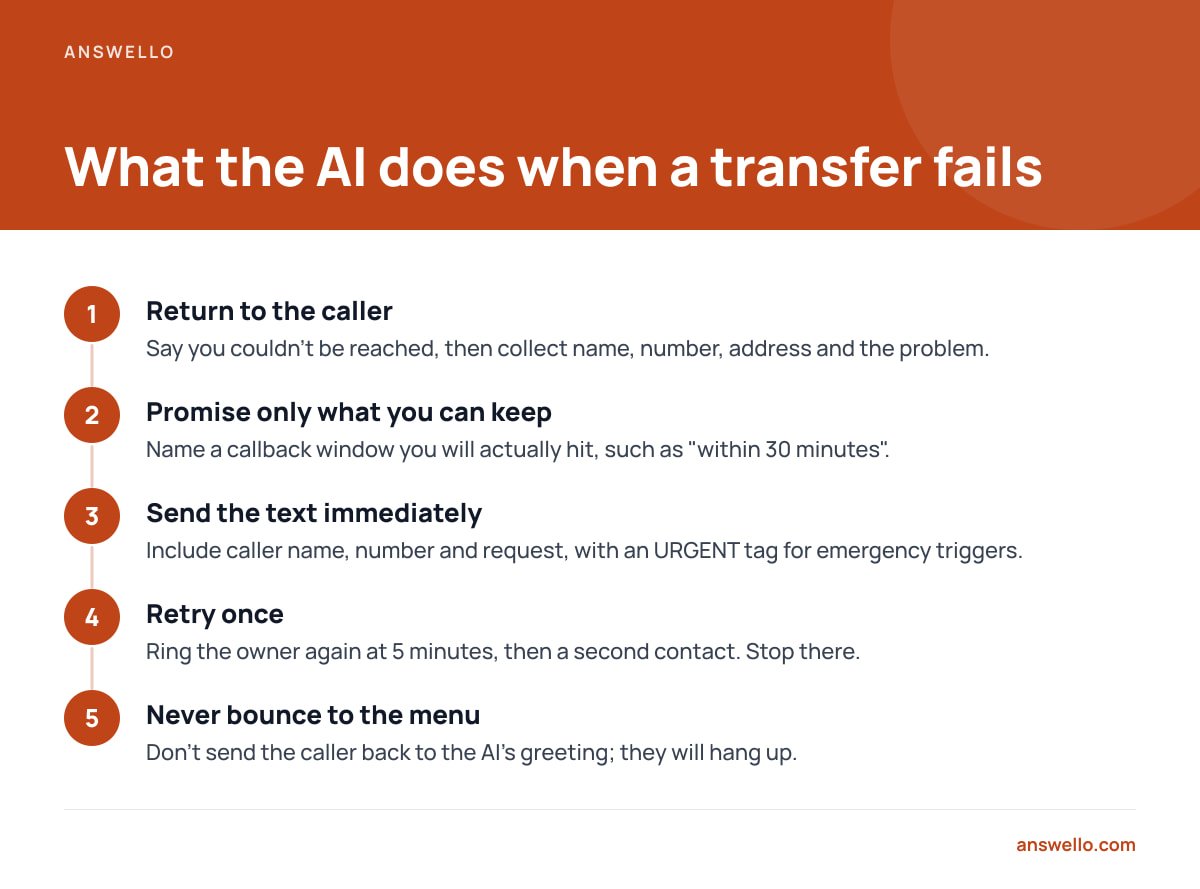
Every transfer path needs a defined failure state. If the keypress never comes, the AI should do the following, in this order:
- Return to the caller. Tell them plainly that you couldn't be reached right now, then collect name, number, address and the problem.
- Promise only what you can keep. Name a callback window you will actually hit, such as "within 30 minutes". An honest "by 9 a.m." beats a vague "soon" that you miss.
- Send the text immediately. Caller name, number and request, with an URGENT tag if it came through the emergency trigger. A recording and transcript should be a tap away.
- Retry once. Ring the owner again at 5 minutes. If that fails, ring a second contact. Stop there, because a loop that keeps ringing your phone all night will teach you to ignore it.
- Never bounce a caller back to the menu. Someone who was told a person would pick up and ends up listening to the AI's greeting again will hang up.
Disclosure and Recording: Two Lines for the Greeting
Two legal points affect the greeting you write. First, AI disclosure: Article 50 of the EU AI Act requires that people be informed they are interacting with an AI system unless that is obvious from the circumstances. Even where no rule applies, a greeting like "You've reached Smith Plumbing's assistant" costs you nothing. Callers are more forgiving of AI answering than most owners expect, as the piece on what trades hear when customers meet an AI receptionist shows.
Second, recording consent. The FCC explains that federal law requires at least one party's consent to record a call, and that many states require all parties to consent. If you record calls and transcribe them, put "this call may be recorded" in the greeting and move on.
Test Your Routing With Ten Calls Before You Go Live
Call your own number ten times from a second phone and run these cases:
- A routine quote request, to confirm the AI finishes it without transferring.
- A call that says "I smell gas", to confirm the immediate transfer.
- A request for a person in the first sentence.
- Two muddled answers in a row, to trigger the failed-clarification rule.
- The same call, with your phone off, to test the unreachable path.
- The same call, with your phone ringing and you ignoring it, to test the timeout.
- Letting your voicemail answer the transfer leg, to check the keypress rule catches it.
- A redial within 10 minutes.
- A call from a number on your VIP list.
- A street address read aloud, then checked against the text you receive.
Most errors hide in number 10. Mishearing an address turns a hot lead into a wasted truck roll, and the write-up on how address errors cost trades jobs explains why you want the AI to read the address back every time.
Get a Missed-Call Safety Net Without Another Monthly Bill
The routing above has one weak spot: the moment you can't answer. Answello is built for that moment. It picks up the calls you miss, identifies the caller and what they need, and texts you the name, number and request with a transcript and recording in the dashboard. It runs multiple brands and numbers under one payment. The self-install package is $399 one time, the fully configured package with a custom script is $895 one time, and the optional "looked after" tuning plan is $119 a month, cancel anytime.
Answello's core job is catching the call you missed and getting you a clean summary. If you want a live transfer to a specific person with a keypress screen, check the spec sheet for your phone setup before you buy, and test it with the ten calls above. We'd rather you find a gap on a test call than on a gas-leak call.
Frequently Asked Questions
Should the AI or a person answer calls first?
For a small crew, ring the owner first for about 20 seconds and let the AI answer on no answer, busy or unreachable. That keeps live conversations live and uses the AI as the safety net. Choose AI-first only if you have someone in an office who reliably takes transfers during set hours.
How long should the AI wait before giving up on a transfer?
Start at 20 seconds and keep it at least 5 seconds shorter than your carrier's voicemail pickup. Test that by calling your own number and timing it. In North America 20 seconds is about four rings, but ring cadence differs elsewhere, so set it in seconds.
What is the difference between a warm and a blind transfer?
A blind transfer forwards the call and the AI drops off, so it can't tell whether a person or a voicemail greeting answered. A warm transfer keeps the AI on the line until a person accepts. For urgent calls, use a bridged leg that connects only after a keypress.
What percentage of calls should transfer to a human?
Our starting target is under 20%. If more calls than that reach your phone, shorten the trigger list or move more request types into the message-taking lane. Only calls needing you in the next few minutes should interrupt you.
Do I have to tell callers they are speaking to an AI?
Under Article 50 of the EU AI Act, people must be informed they are interacting with an AI system unless it is obvious. In other places the rules vary, but a one-line disclosure in the greeting is cheap and avoids surprises. If you record calls, add a recording notice too.
Sources
- RFC 3515: The Session Initiation Protocol (SIP) Refer Method | IETF
- Article 50: Transparency Obligations for Providers and Deployers of Certain AI Systems | EU Artificial Intelligence Act
- Recording Telephone Conversations | Federal Communications Commission
- Recording Phone Calls and Conversations: 50-State Survey | Justia
Leave a Reply