
A call recording and transcript dashboard for small business should show you who called, what they wanted, and whether anyone called them back, without making you replay audio. The real choice is between a searchable written record you will read and a pile of audio files you will never open. For most trades owners, transcripts and short summaries are more useful than raw recordings. A one-time purchase also usually costs less than paying monthly for each number.
TL;DR:
- Transcripts and one-line summaries do the daily work. Raw audio is mostly for settling disputes.
- In the U.S., federal law requires consent from only one person on the call, but California, Florida, Pennsylvania, Washington and several other states require everyone's consent. Play a recording notice on every call.
- Never let card numbers or security codes sit in a recording or transcript. PCI DSS forbids storing card security codes after authorization.
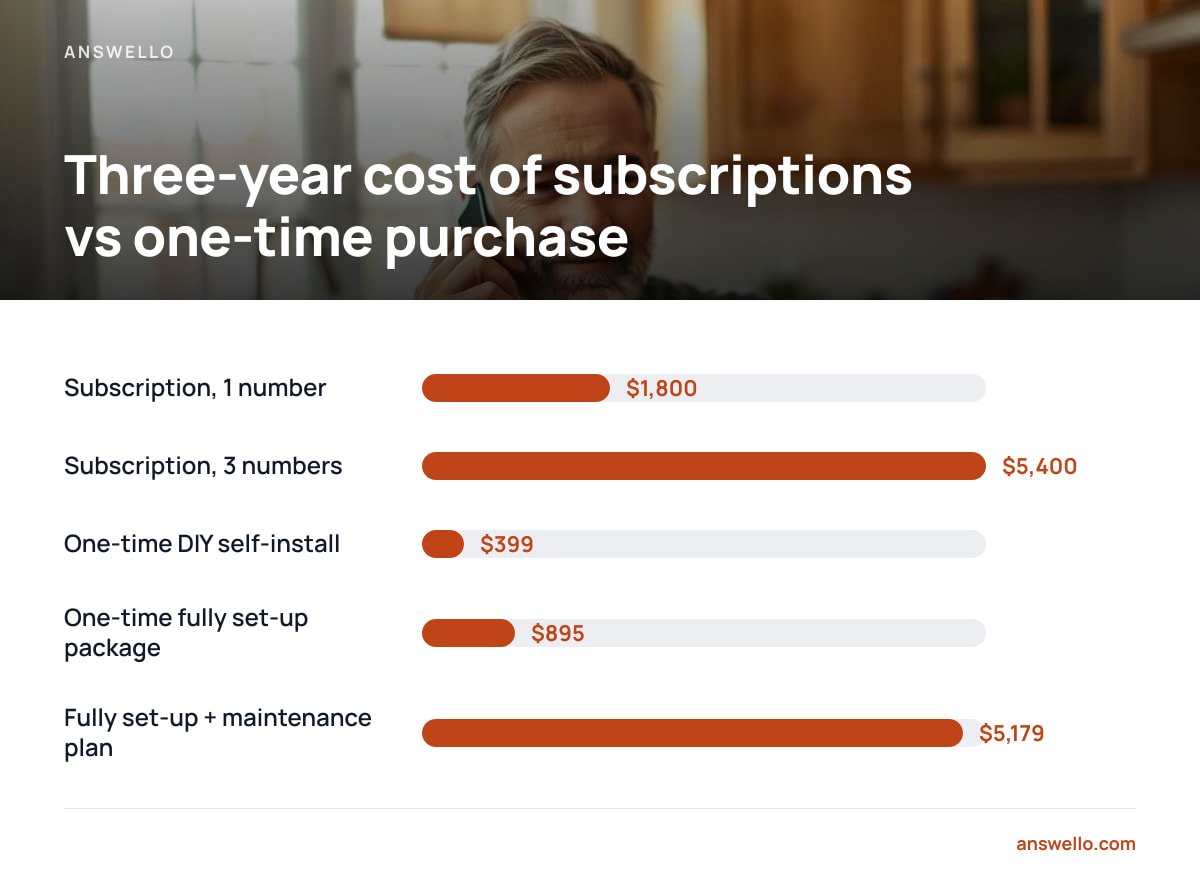
- Per-number monthly pricing adds up fast. A $50-a-month tool on three brand numbers costs $5,400 over three years.
- Before you buy, check that the dashboard has brand tagging, search, export and audio playback from a timestamp.
Table of Contents
- What a Call Recording and Transcript Dashboard for Small Business Should Actually Show You
- Recordings, Transcripts or Summaries: Which One You'll Actually Use
- The Consent Rules You Can't Skip, Wherever You Operate
- Card Numbers, Addresses and Other Things You Don't Want Sitting in a Transcript
- What It Costs: Monthly Dashboards vs. a One-Time Purchase
- Running Several Brands or Numbers: The Feature Usually Billed Per Line
- Five Things to Check Before You Buy
- Get Every Missed Call Written Down Without Paying Monthly Per Number
- Frequently Asked Questions
- Sources
What a Call Recording and Transcript Dashboard for Small Business Should Actually Show You
When you open the dashboard at 7 p.m. after a day on site, you need to clear your callbacks in under ten minutes. Everything on the screen should help with that, and anything else is clutter.
A good dashboard puts five things on one row for every call:
- Caller name and number. If the caller gave a name, it should be pulled out and shown, not buried inside the transcript.
- What they wanted, in one line. For example, "Leaking water heater, wants someone tomorrow morning" beats a 400-word transcript you have to skim.
- Which brand or number they called. If you run a plumbing name and a drain-cleaning name, you need to know which one the customer thinks they're talking to before you call back.
- Urgency. A burst pipe and a request for a quote next month should not look the same.
- Status. Called back, booked, or ignored. Without this, the dashboard is a log of calls, not a to-do list.
Full recordings and full transcripts should sit one click below that row. You'll rarely need them, but when you do, they need to be easy to find.
Recordings, Transcripts or Summaries: Which One You'll Actually Use
Most vendors sell recording as the headline feature. For a small service business, it's the feature you'll use least. Audio takes as long to review as the call itself. A three-minute call takes three minutes to replay, and nobody replays twenty calls a night.
Transcripts are faster because you can scan them in seconds and search them. Summaries are faster still. In practice, owners read the summary, check the transcript when something looks off, and open the audio only when there's a dispute. A dispute might be a customer claiming they were quoted a different price, or a caller whose street name the transcription got wrong.
| Format | Time to review a 3-minute call | Searchable | Best used for |
|---|---|---|---|
| Audio recording | About 3 minutes | No | Disputes, accents, unclear addresses |
| Full transcript | 20 to 40 seconds | Yes | Checking details, quoting exact words |
| One-line summary | 3 to 5 seconds | Yes | Daily callback list |
Our position is that you should buy for the summary and keep the recording as a backup. If a dashboard makes you open a call to find out what it was about, it was designed for call centers with supervisors, not for an owner reading it on a phone.
Pro Tip: Transcription often gets street names and suburb names wrong, especially uncommon ones. Before you commit to any tool, make sure you can tap a word in the transcript and jump to that exact moment in the audio. If you have to scrub through the recording to find "Kowalczyk Road," you'll stop checking addresses, and eventually you'll send a van to the wrong place.
The Consent Rules You Can't Skip, Wherever You Operate
Recording calls is legal in most places, but the rules for telling people about it differ. Getting this wrong is the main legal risk in buying any recording tool.
In the United States, the federal Wiretap Act allows a recording if one party to the call consents. That provision is set out in 18 U.S.C. § 2511(2)(d), as published by Cornell Law School's Legal Information Institute. If your system answers the call, you are a party to it, so federal law is satisfied.
One-party consent is the federal floor in the U.S. Several states require all-party consent, including California, Florida, Pennsylvania and Washington, which means every person on the call has to agree to being recorded.
State law can be stricter than federal law, and the caller's location can matter as well as yours. The Reporters Committee for Freedom of the Press's state-by-state recording guide is the clearest plain-English summary of where each state stands.
In the UK and the European Union, recording a call counts as processing personal data. Under the GDPR, Article 6, you need a lawful basis to do it, and the transparency rules mean you have to tell callers it's happening. The UK Information Commissioner's Office publishes guidance for small businesses on how this applies.
| Where you operate | Basic rule | What to do |
|---|---|---|
| U.S. one-party states | One participant's consent is enough | Play a notice anyway, because callers may be in all-party states |
| U.S. all-party states (e.g. CA, FL, PA, WA) | Everyone on the call must consent | Play a notice before recording starts |
| UK and EU | Lawful basis plus transparency | Notice at the start, and a privacy notice that covers recordings |
| Elsewhere | Varies by country and region | Check local rules before turning recording on |
The simplest approach is to play a short notice on every call, such as "This call may be recorded so we can get your details right." It takes about four seconds, it covers you almost everywhere, and callers rarely hang up because of it.
Card Numbers, Addresses and Other Things You Don't Want Sitting in a Transcript

A transcript stores whatever the caller says. Sometimes that includes things you shouldn't keep, and payment card details are the biggest problem.
The PCI Security Standards Council's PCI DSS prohibits storing sensitive authentication data after a payment is authorized, and that includes the three- or four-digit card security code. A recording or transcript containing that code counts as storage. If a customer reads out their full card details to your answering line, you now have a compliance problem sitting in a dashboard.
Here's how to handle it:
- Never take payment on the recorded line. Have the answering script say that payment is handled at the job or by secure link.
- Ask the vendor whether it redacts numbers. Some systems automatically mask number strings that look like card numbers. Many don't.
- Test it yourself. Call your own line and read out 4111 1111 1111 1111. It's the standard Visa test number, so it's safe to use. Then see whether it shows up unmasked in the transcript.
Gate codes, alarm codes and "the key's under the mat" are a smaller version of the same risk. They're useful to the tech going to the job, but you don't want them kept forever. Look for a setting that controls how long recordings and transcripts are kept, and use it.
What It Costs: Monthly Dashboards vs. a One-Time Purchase

Most call recording dashboards charge per month, often per user or per number. That looks cheap in month one and expensive by year three, especially if you run more than one brand.
Here is the three-year cost of an illustrative $50-a-month tool, compared with paying once:
| Option | Upfront | Monthly | 3-year total |
|---|---|---|---|
| Subscription, 1 number at $50/mo | $0 | $50 | $1,800 |
| Subscription, 3 brand numbers at $50/mo each | $0 | $150 | $5,400 |
| One-time DIY self-install | $399 | $0 | $399 |
| One-time fully set-up package | $895 | $0 | $895 |
| Fully set-up + optional maintenance plan at $119/mo | $895 | $119 | $5,179 |
$5,400 versus $399. That's the three-year gap between three monthly-billed brand numbers and a single one-time install that covers all of them.
The last row shows that the one-time route isn't automatically cheaper. If you add a monthly maintenance plan and keep it for three years, the total comes close to the subscription figure. The difference is that the plan is optional and you can cancel it. Without it, the system keeps answering calls.
For a fuller breakdown of answering-service pricing models, see what an AI call answering service actually costs.
Running Several Brands or Numbers: The Feature Usually Billed Per Line

Plenty of trades owners run two or three brand names from the same van and the same phone. Examples include a plumbing brand and a drain brand, or a residential name and a commercial name. Subscription dashboards usually treat each number as a separate account or seat, which multiplies the bill.
What you need instead is one dashboard, every number feeding into it, and each call clearly tagged with the brand it came in on. That tag decides how you answer the callback. Calling a drain-cleaning customer back as "Smith Plumbing" makes your business look like it doesn't know its own name.
When you compare vendors, ask two direct questions:
- Does adding a second or third number change the price? If the answer is yes, run the three-year math above with your real number count.
- Can each number have its own greeting and script? A shared greeting across brands defeats the point of having separate brands.
If you're specifically in the trades, our guide to answering services for busy trade jobs covers how this plays out when you're on a roof or under a house all day.
Five Things to Check Before You Buy
These five features separate a dashboard you'll still use in six months from one you'll forget about:
- Search across every call. You should be able to type "Henderson" or "boiler" and find the call from last March. If you can't search, you just have a pile of files.
- Mobile-first layout. You'll check it from a truck between jobs. Pinch-and-zoom tables don't count.
- Instant text alerts. The dashboard is the record, but the text message is what actually gets you to call back while the lead is still interested.
- Export. CSV or PDF, so the record goes with you if you ever switch tools. If you can't export your call history, the vendor controls it.
- Retention control. You decide how long recordings are kept, not the vendor.
If you want to see how quickly this can run on your own line, the DIY setup walkthrough shows how to forward missed calls in about an hour.
Get Every Missed Call Written Down Without Paying Monthly Per Number
Answello picks up the calls you miss while you're on a job and finds out who's calling and what they need. It then texts you the caller's name, number and request, with the full recording and transcript saved in a dashboard you can search later. Every brand and number you run is covered under one payment. The self-install package is $399, and the fully set-up version with a custom script for your business is $895. Both are paid once. If you want someone to keep tuning it, the looked-after plan is $119 a month, and you can cancel it whenever you like.
There's one honest limit. Answello is built to catch missed calls, not to record every outbound call your techs make. If you need full call-center recording across a team, it isn't designed for that. Whichever tool you buy, check the retention and redaction settings on the spec sheet, including ours.
Frequently Asked Questions
Is it legal for a small business to record customer calls?
Yes, in most places, as long as you follow the consent rules where you and the caller are located. U.S. federal law requires consent from only one party, but states such as California, Florida, Pennsylvania and Washington require everyone on the call to agree. Playing a short recording notice at the start of every call covers you in almost every jurisdiction.
Do I need recordings if I already get transcripts?
You need them less often than you'd expect, but it's worth keeping them. Transcripts and summaries handle daily callbacks much faster. The audio is useful for disputes, misheard addresses and strong accents, where you need to hear exactly what was said.
Can a call transcript dashboard handle multiple business numbers?
Many can, but they often charge per number or per seat. Look for one dashboard where every number feeds in and each call is tagged with the brand it came in on. Check whether adding numbers raises the price before you commit.
What should I do if a customer reads out their card number on a recorded line?
Delete or redact that recording and transcript, because PCI DSS forbids storing card security codes after authorization. To prevent it, have your answering script say that payment is taken at the job or by secure link. Test whether your tool masks card numbers by calling with the Visa test number 4111 1111 1111 1111.
How much does a call recording and transcript dashboard cost for a small business?
Monthly tools commonly run tens of dollars per number. That reaches $1,800 or more per number over three years at $50 a month. One-time-purchase systems cost a fixed amount upfront, such as $399 to $895, with no required monthly fee. Always work out the three-year total using your real number of lines.
Sources
- 18 U.S. Code § 2511 – Interception and disclosure of wire, oral, or electronic communications | Legal Information Institute, Cornell Law School
- Reporters Recording Guide | Reporters Committee for Freedom of the Press
- Art. 6 GDPR – Lawfulness of processing | Intersoft Consulting (GDPR text)
- Information Commissioner's Office | UK Information Commissioner's Office
- PCI Data Security Standard | PCI Security Standards Council
Leave a Reply