
A DIY AI phone answering setup takes most small businesses about an hour. You install the answering system, write a short script, and then use your carrier's conditional call forwarding so that only the calls you miss reach the AI. The hard part is not the software. It's whether you pay for that software once or every month for each phone number. If you run two or three trade brands, the per-number subscription is where the real cost hides.
TL;DR:
- Conditional call forwarding sends unanswered, busy, or unreachable calls to the AI, so your phone still rings first.
- On most GSM carriers the setup is three dial codes: *61 for no answer, *62 for unreachable, *67 for busy.
- A good script collects five things: name, callback number, location, the problem, and how urgent it is.
- If your system texts summaries from a standard US 10-digit number through an app, that traffic must be registered for A2P 10DLC or carriers may filter it.
- When you run several brands, a one-time purchase beats per-number monthly plans by a wide margin over five years.
Table of Contents
- What a DIY AI Phone Answering Setup Actually Involves
- Three Ways to Do It Yourself, and What Each Really Costs
- Setting Up Conditional Call Forwarding, Code by Code
- Writing the Script: Five Things to Get in 30 Seconds
- Getting the Summary to Your Phone Without Carrier Filtering
- Recording Calls Legally: The Consent Line You Can't Skip
- Testing Before You Trust It: A 15-Minute Checklist
- DIY or Fully Set Up: Which One We'd Pick
- Get Every Missed Call Answered for $399, Paid Once
- Frequently Asked Questions
- Sources
What a DIY AI Phone Answering Setup Actually Involves
A DIY setup has three moving parts. The first is the AI that answers and talks to callers. The second is a forwarding rule that decides which calls reach the AI. The third is a delivery channel that gets the caller's details back to you. If any one of the three is missing, you have a voicemail box with extra steps.
The forwarding rule matters most, and most people get it wrong. You don't want the AI answering every call. You want it answering the calls you would otherwise lose: when you're up a ladder, under a sink, or already talking to another customer. That's conditional forwarding. Your phone rings as normal, and only if you don't pick up does the call go to the AI.
Doing it yourself does not mean building the AI. You don't need to touch a cloud telephony platform, write code, or connect a language model to a phone line. A self-install package handles all of that. Your job is configuration: the forwarding codes, the script, and the testing.
This is also different from a text-back app. A text-back app sends the caller an automatic SMS after they hang up. An AI answering setup actually takes the call, asks questions, and hands you a written summary. Callers who hate voicemail tend to hate automated texts too. Most of them will talk to something that answers.
Three Ways to Do It Yourself, and What Each Really Costs
You have three realistic DIY routes. They differ less in what they do than in how you pay for them.
Build it from scratch
You rent a phone number from a cloud telephony provider, connect it to a speech and language model, write the call logic, and set up SMS delivery yourself. You pay per minute, per message, and per model call, and you maintain all of it. This only makes sense if you or someone on staff writes software for a living.
Self-serve monthly AI answering plans
You sign up, forward your number, and pay every month. Setup is easy. The catch shows up when you add brands: most plans charge per number or per location. Two brands means two subscriptions. We break down typical pricing in our guide to what an AI call answering service actually costs.
One-time self-install systems
You buy the software once, install it, and forward your numbers to it. There's no monthly fee unless you choose to add a maintenance plan.
| Route | Upfront cost | Ongoing cost | Multiple brands/numbers | Who it suits |
|---|---|---|---|---|
| Build from scratch | Your time (often days) | Usage fees plus your maintenance time | Possible, you build it | Owners who code |
| Monthly self-serve plan | Low or none | Monthly fee, often per number | Usually one fee per number | Single-number businesses testing the idea |
| One-time self-install | One payment | None required | Often included in one payment | Trades running several numbers who are done with subscriptions |
Here is a simple worked example. Say you pay $50 a month for each of three brand numbers. That's $1,800 a year, or $9,000 over five years, and the system answers your phone no better in year five than in month one. Monthly billing isn't always wrong. The point is to know what you're signing up for. Our breakdown of which subscription business software is worth paying for covers when recurring billing actually earns its keep.
Our position: if you run more than one number and expect to be in business in three years, buy once. Monthly plans make sense for a three-month trial, not as the long-term arrangement.
Setting Up Conditional Call Forwarding, Code by Code

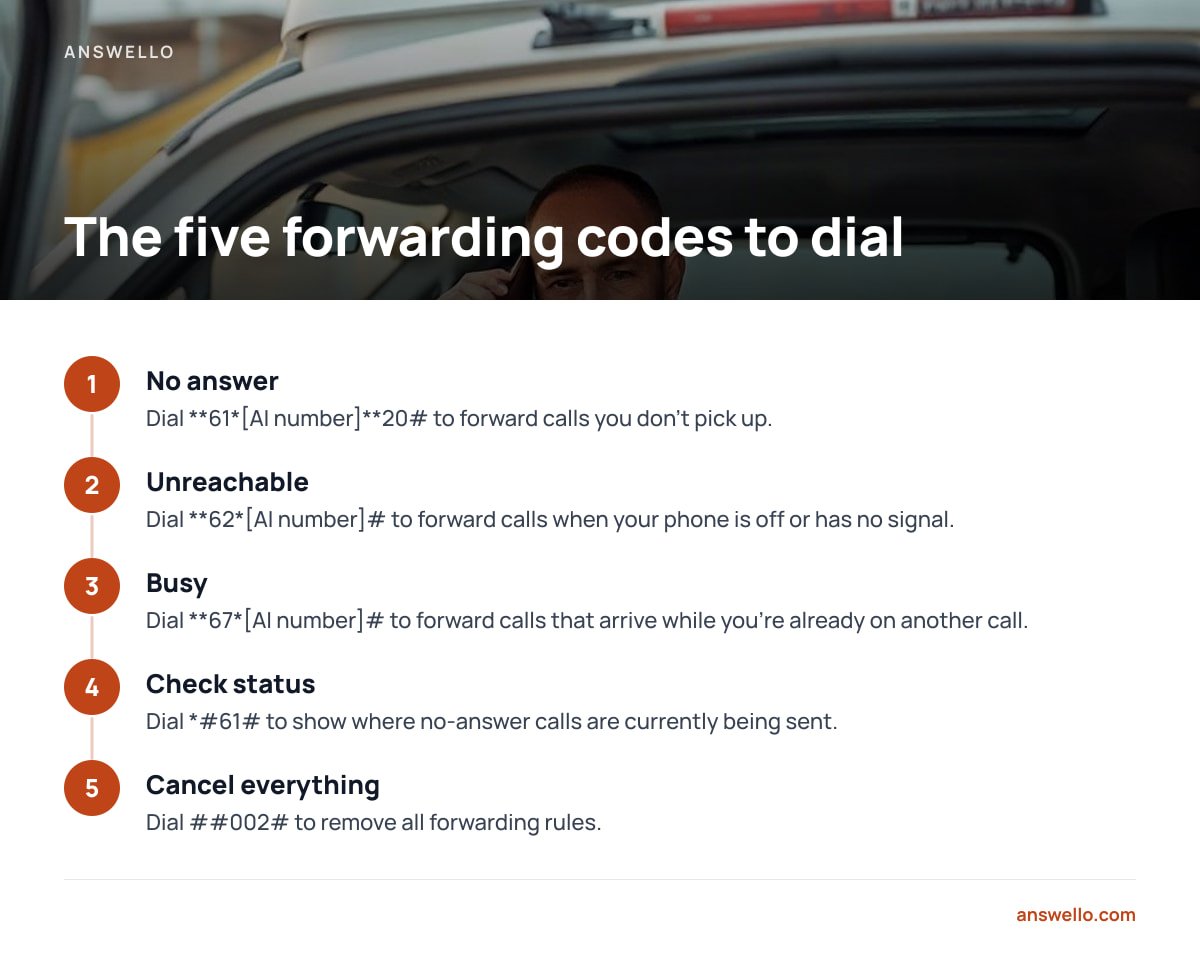
Most mobile carriers that run on GSM-family networks support standard forwarding codes. The call forwarding conditions themselves are defined in 3GPP TS 22.082, the international specification for call forwarding services. You dial each code from the phone you want to forward, then press call.
- No answer:
**61*[AI number]**20#. Forwards calls you don't pick up. The last number is the ring time in seconds before the call forwards. - Unreachable:
**62*[AI number]#. Forwards calls when your phone is off or has no signal, which is useful for basements, roof spaces, and rural jobs. - Busy:
**67*[AI number]#. Forwards calls that arrive while you're already on another call. - Check status:
*#61#. Shows where no-answer calls are currently being sent. - Cancel everything:
##002#. Removes all forwarding rules. Keep this one written down.
The no-reply timer only accepts 5 to 30 seconds, in 5-second steps. Set it to 20 and you get four or five rings before the AI picks up.
Some carriers, and most business VoIP and desk-phone systems, don't use these codes. On those, you set forwarding through your account portal or by calling the carrier. Look for options called "forward on no answer," "forward when busy," and "forward when unreachable." If you only see "forward all calls," that's the wrong setting for this job.
Pro Tip: On many carriers, voicemail is itself just a conditional forward. When you set *61 to the AI number, you're replacing your voicemail, not adding to it. That's usually what you want. But dial *#61# before you start and write down the number it shows. That's your old voicemail destination, and you'll need it if you ever want to switch back.
Writing the Script: Five Things to Get in 30 Seconds
The script decides whether your summary text is useful or useless. A caller who has just been forwarded will stay on the line for about as long as a short conversation with a human would last. Ask only for what you need to call them back and quote.
- Name. Ask for their first name at minimum. You'll use it when you call back.
- Callback number. Ask for it even though caller ID usually captures it. Calls from a work line or a withheld number often don't show the number they want you to use.
- Location. A suburb or postcode is enough. This tells you whether the job is in your area before you spend time on a callback.
- The problem, in their words. "Water coming through the ceiling" tells you more than any category you could pick from a list.
- Urgency. Ask directly: "Is this an emergency, or can it wait until tomorrow?"
If you run several brands, each one needs its own greeting. A caller to your plumbing brand should never hear your electrical brand's name. For trades with genuine emergencies, such as no heat in winter or a gas smell, the script should also tell callers what to do right now. Our HVAC receptionist guide covers triage wording that holds up when a caller is upset.
Keep the greeting under 10 seconds. "Thanks for calling Smith Plumbing. We're on a job right now, but I can take your details and get them straight to the team" does the job. Don't apologize three times, and don't pretend to be a person.
Getting the Summary to Your Phone Without Carrier Filtering
The AI can take a perfect message and it means nothing if the text never reaches you. Your setup has to account for how carriers treat automated texts.
In the US, texts sent by software from a standard 10-digit number are classed as application-to-person (A2P) messaging. Carriers require that traffic to be registered through The Campaign Registry under the A2P 10DLC system. Unregistered traffic can be filtered or blocked without any warning to you. If you build your own setup on a cloud phone platform, you handle registration yourself. If you buy a packaged system, ask the vendor how its summary texts are sent and registered.
Carrier expectations for business messaging are set out in CTIA's messaging principles and best practices. The practical takeaway is that messages going to you, the account owner who asked for them, are the easiest kind to get delivered. Problems start when you also auto-text the caller, because that's messaging a consumer and the consent rules are stricter.
Always ask for a backup channel alongside SMS: email, a dashboard, or both. If you're out of signal all afternoon, the transcript should still be waiting when you sit down at night.
Recording Calls Legally: The Consent Line You Can't Skip
If your system records calls or keeps transcripts, consent law applies. Recording law varies by place, and you have to follow the rules for wherever your callers are.
In the US, most states require only one party to consent to a recording. A minority require every party to consent, including California, Florida, Illinois, Pennsylvania, and Washington. The Reporters Committee for Freedom of the Press recording guide lists the rules state by state, and it's the quickest way to check yours. Calls that cross state lines make this messier, so assume the stricter rule applies.
The simple fix covers every case: add one line to the greeting. "This call may be recorded so we can pass your details to the team" takes three seconds and removes the question entirely. Outside the US, recording rules are often tied to data protection law, so check with your national regulator before you switch recording on.
Testing Before You Trust It: A 15-Minute Checklist

Don't go live until you've called your own number from a different phone and run each scenario. Every forwarding rule is a separate setting, and each one can fail on its own.
- No-answer test. Let it ring out. The AI should pick up at roughly your timer setting.
- Busy test. Call from a second phone while you're already on a call. The AI should answer immediately.
- Unreachable test. Turn on airplane mode, then call. This is the rule people most often forget to check.
- Summary test. Confirm the text arrives within a minute or two, and check that it shows the right name, number, and request.
- Per-brand test. Call each brand number separately and make sure each greeting matches the brand.
- After-hours test. If you handle nights differently, test at night. Our out-of-hours call service guide covers what the after-hours greeting should promise.
Repeat this checklist after any change of carrier, SIM swap, or phone plan. Carriers sometimes reset forwarding rules when an account changes, and they won't tell you.
DIY or Fully Set Up: Which One We'd Pick

Do it yourself if you have one or two mobile numbers on a carrier that accepts the standard codes, you're comfortable dialing them, and you can spend an hour on a script and testing. That covers most sole traders.
Pay someone to set it up if you run three or more brands, use business VoIP or desk phones, or deal with real emergencies where a badly worded triage question costs you a job or worse. The extra cost buys you a script someone has stress-tested and forwarding someone has verified on your specific phone system.
Either way, don't let either choice lock you into a monthly fee you didn't need. Our five-year view of low-cost answering services shows how fast "cheap per month" adds up.
Get Every Missed Call Answered for $399, Paid Once
Answello is built for exactly the setup this guide describes. It answers the calls you miss, asks the caller who they are and what they need, and texts you their name, number, and request, with the full recording and transcript in a dashboard. The do-it-yourself package costs $399, one time, and covers multiple brands and numbers under that single payment. If you'd rather not touch forwarding codes at all, the fully set-up package costs $895 and includes a custom script for each brand.
One honest caveat: Answello can't change your carrier settings for you on the DIY package. You still dial the forwarding codes or use your phone provider's portal. If your business VoIP system hides those options, the set-up package is the better buy. An optional $119/month maintenance plan handles ongoing script tuning, and you can cancel it anytime. You never need it to keep the phones answered.
Frequently Asked Questions
How long does a DIY AI phone answering setup take?
Most owners finish in about an hour. That covers installing the system, writing a short script, and dialing three forwarding codes. Leave another 15 minutes to test every forwarding scenario before you rely on it.
Will my phone still ring if I forward calls to an AI?
Yes, as long as you use conditional forwarding rather than "forward all calls." Your phone rings first, and the AI only answers if you don't pick up, are on another call, or have no signal.
What happens to my voicemail when I set up call forwarding?
On many carriers, voicemail is itself a no-answer forward, so pointing that forward at the AI replaces voicemail. Dial *#61# before you start and write down the existing number so you can restore voicemail later if you need to.
Do I need to tell callers the call is being recorded?
In some US states and many other countries, you must get consent from everyone on the call. Adding one line to the greeting, such as "this call may be recorded," covers you everywhere and takes about three seconds.
Can one AI answering system handle several business brands?
Yes, if the system supports multiple numbers with a separate greeting for each one. Check whether pricing is per number, because per-number monthly fees are where multi-brand businesses overpay the most.
Sources
- 3GPP TS 22.082: Call Forwarding (CF) supplementary services | 3GPP
- Reporter's Recording Guide | Reporters Committee for Freedom of the Press
- A2P 10DLC Campaign Registration | The Campaign Registry
- Messaging Principles and Best Practices | CTIA
Leave a Reply